

|
|
|


FAQ: Can I add course equivalencies in SilkRoad Learning?
Does SilkRoad Learning support course equivalencies?
- Yes, equivalencies are defined on the Competency Properties page. Any one of the specified learning options may be completed for the Competency to be considered complete.
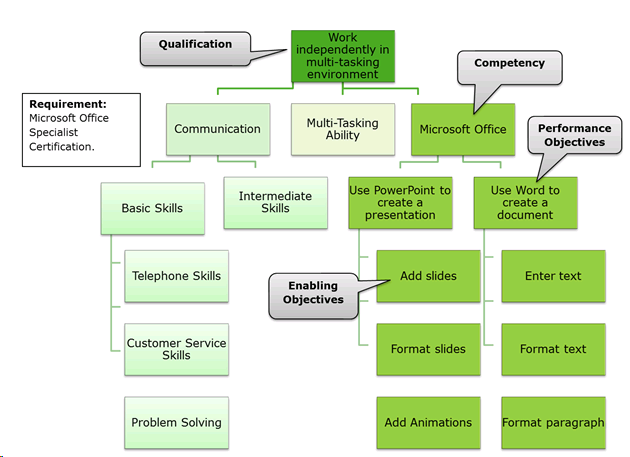
Qualifications can include a variety of different types of training, including:
- Competencies– capabilities, abilities, skills, proficiencies, expertise and experience required to perform a job, role, or task.
- Performance Objectives – Specific behaviors someone should be able to do to continuously improve job performance.
- Enabling Objectives – smaller tasks, skills, or knowledge that are needed to master a Performance Objective
- Requirements – certifications or licenses required to perform a job, role, or task.
- Interventions - instructor led courses and eCourses
How to handle multiple equivalencies?
- We have some clients today that construct a content cluster in a blended eCourse that contains the multiple electives, then add a rollup rule to rollup completion when a selected amount are completed out of the total amount. (Example: 5 out of 8)
- The approach can work for any type of content that can be linked to a content structure, including instructor lead training sessions. SilkRoad Learning will track the completion status for all activities, then roll up the completions to the "Elective" object when the rule is met.
Competencies identify the knowledge and skills expected for a job. Competencies can be assessed for individual students by marking the competency as being mastered.
This enables the assignment of learning activities as employees advance or change positions within the company, as SilkRoad Learning tracks which competencies have been mastered.
Optionally, competencies can be associated with Performance Objectives and corresponding Enabling Objectives (see illustration above). To add Enabling and Performance objectives to SilkRoad Learning, see the Table of Contents – Session 4 for "Adding Enabling and Performance Objectives to SilkRoad Learning."
According to our task analysis, a person with this job should be competent using Microsoft Office.
To add competencies, navigate to Learning > Direct > Competencies:
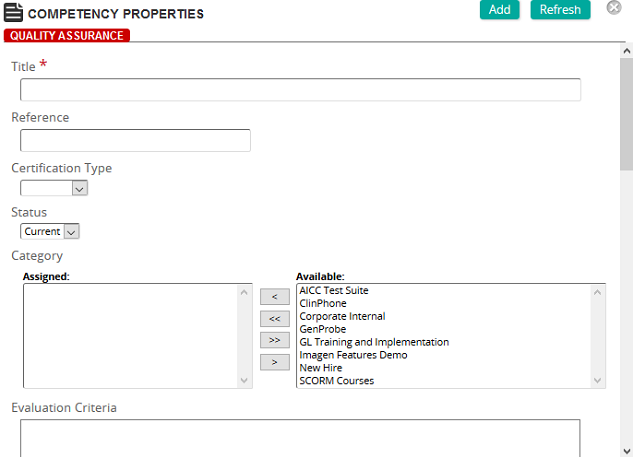
- Add a title to the competency.
- Add a reference to the competency.
- Add a category (optional).
- Determine how the competency is to be evaluated and type that description in the text box.
- Determine the criteria to use to evaluate the competency and type that information in the text box.
- If needed, add the equivalences that support and help the student fulfill the competency. Equivalencies are used to identify interventions that equally satisfy a training need or objective. They can be ecourses, training activities, assignments or requirements.
For example, if you want to give the student the option to take an ecourse or a training activity to satisfy this competency, add both interventions to the equivalency area.
- Click Add at the top of the properties page to save your selections.
| ©2021 SilkRoad Technology. All rights reserved. |
| Last modified on: 2/4/2021 2:47:52 PM |