|
|
|


IdP Edit page
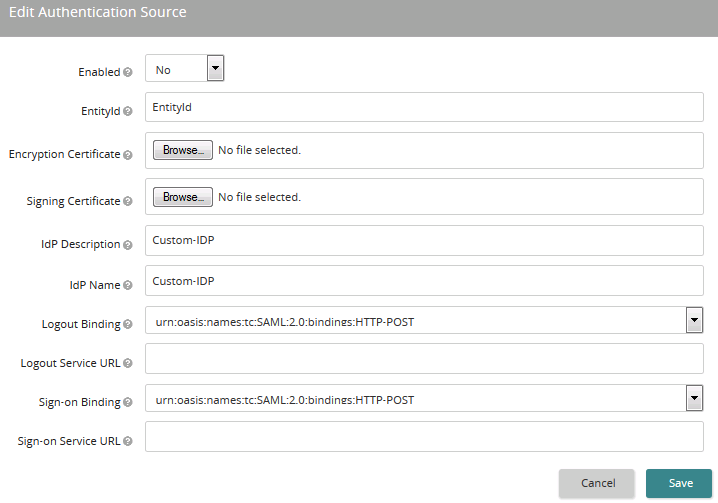
Use this page to make changes an IdP authentication source. The settings you can edit depend on how the IdP was set up. When you access this page, if a setting is grayed out, it is not editable.
If the IdP was generated from a metadata URL, you can only manage these settings: Enabled, IdP Description, IdP Name, and Metadata URL.
If the IdP was generated from a metadata file, you can only manage these settings: Enabled, IdP Description and IdP Name.
To update an existing metadata file generated IdP, you can re-upload the file. If the EntityId is the same, it will update the existing IdP instead of generating a new IdP.
Settings
Enabled
If set to Yes, Life Suite Login is recognized by Life Suite Authentication as a valid authentication source. This does not necessarily mean that this authentication source is fully functional. Additional configuration may be required. If multiple authentication sources are enabled, an unauthenticated user is presented with a choice of all authentication sources.
If set to No, the authentication source is not enabled.
EntityId
The unique name/entity of the IdP.
Note: Also referred to as audience or audience restriction by some IdPs.
Encryption Certificate
The public encryption certificate from your identity provider. Click Browse to find and upload.
Signing Certificate
The public signing certificate from your identity provider. Click Browse to find and upload.
Metadata File
The metadata file for the authentication source. This is shown if the IdP was created from a file (not editable).
Metadata URL
The metadata URL for the authentication source. This is shown if the IdP was generated from a URL (editable).
IdP Description
Enter the name or label presented to users for selection when multiple authentication sources are enabled.
Tip: Use a descriptive name that makes it clear which IdP applies to a user.
IdP Name
The name or label used within Life Suite Authentication to refer to the authentication source/IdP.
Logout Binding
The binding the IdP uses for logout messages.
Note: An IdP's binding can be different than Life Suite Authentication's binding.
Logout Service URL
The URL that Life Suite Authentication calls to complete a single logout (SLO) scenario.
Sign-on Binding
The binding the IdP uses for sign-on messages.
Note: An IdP's binding can be different than Life Suite Authentication's binding.
Sign-on Service URL
The IdP that Life Suite Authentication routes to for authentication.
Note: Also referred to as the Post Back URL, Destination URL, Recipient URL, or SAML Consumer URL by some IdPs.
In this section |
| Copyright © 2015 SilkRoad Technology. All rights reserved. | 
 Print page Print page |