

|
|
|


FAQ: How to approve enrollments for subordinates
Can a supervisor approve enrollments for their subordinates/direct reports from the Student Portal?
- Yes supervisors can approve eCourses and training events for their direct reports
If a student has been set up in SilkRoad Learning as a supervisor, there is an additional page displayed on the home page. The Approvals page gives the supervisor the ability to approve enrollments for direct reports (when approvals are required).
Requests for enrollment are listed for each direct report. To approve an enrollment:
- Click the check box for the desired student.
- Approve or deny the enrollment.
- Click
 to approve the enrollment.
 - Click
 to deny the enrollment.
- Click
Note: If notifications are enabled, a notification is sent if enrollment is approved, denied, pending, or canceled.
If eCourses have been set up to require approval before a student can launch a course, administrators can go to Learning > Approve > eCourses to approve these requests.
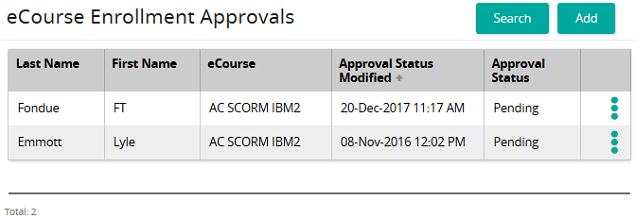
Use the filters to narrow your search or click the Search button to display a current list of eCourses that need approval.
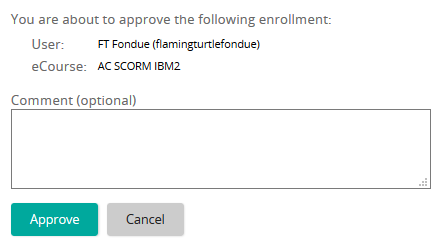
Click  and then click Approve or Deny. You can add comments to the approval or denial, if desired.
| ©2021 SilkRoad Technology. All rights reserved. |
| Last modified on: 4/5/2021 12:37:33 PM |