|
|
|


Managing claims
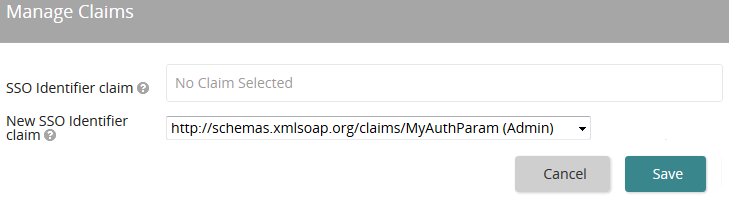
When using an IdP, the feed coming from your system to Life Suite Authentication contains a variety of information, including identity information, based on a standard protocol. Life Suite modules require a SSO ID to identify a user in all of our modules. Life Suite Authentication cannot automatically identify from the IdP feed which identity information to use as the SSO ID. You must select and make the correlation here on the Manage Claims page.
Managing claims only applies to an IdP. It is not needed or displayed for Life Suite Login or Global GetSession.
Settings
SSO Identifier claim
The current claim used to obtain the SSO ID is shown here. This should match the SSO ID used in the Life Suite modules. An example value from the last SAMLResponse containing claims is shown in parenthesis.
New SSO Identifier claim
Select a new claim that contains a value that matches the SSO ID used in the Life Suite modules. This field only needs to be used if the current value does not match the SSO ID value. An example value from the last SAMLResponse containing claims is shown in parenthesis.
In this section |
| Copyright © 2015 SilkRoad Technology. All rights reserved. | 
 Print page Print page |