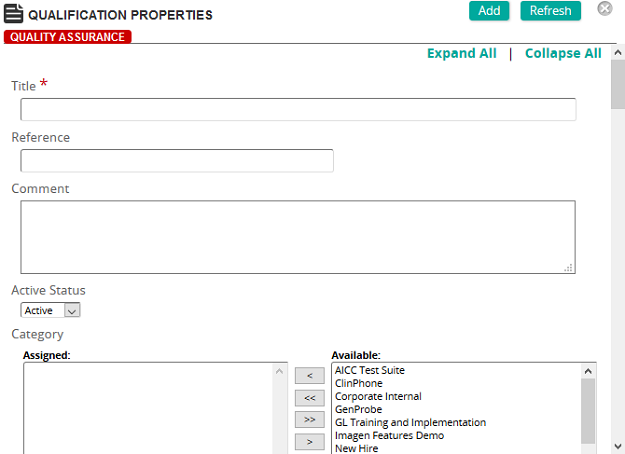
On this page, an administrator defines the properties for a qualification.
Fields
Title: Type the title of the qualification.
Reference: Type a reference for this item to make it easier to find in searches.
Comment: Type a comment. The comment appears in the Learning Plan for students to describe the qualification.
Active Status: Select Active or Inactive.
Categories: To assign categories, click a category or categories from the Available list and use the arrow buttons to move them to the Assigned list.
Categories are used to group similar qualifications and display them as a collapsible group in the Learning Plan.
Certification: Certification and Recertification periods are used to define the time frame that students must certify or renew a certification for a specific training intervention, requirement, or competency. Notifications appear on the Student Home page as a "Recertification Due:" notification, or as a personal notification sent directly to the student based on a defined recertification notification.
Certification and Recertification time periods can be applied to the contents of a qualification for a specific intervention, requirement, or competency.
 Membership Inclusion
Membership Cutoff Date: Use the Membership Cutoff Date to push training to students for a specified period of time. It is the absolute final date that SilkRoad Learning considers as a membership date, and any users who become members of the qualification after this date are ignored.
For example, let's say you want to push specific training for the fiscal year, which runs from January 1, 2013 to December 31, 2013. Students have to take the training before the cutoff date of December 31, 2013. You would select December 31, 2013 from the calendar pop-up. Any student that enrolls in the qualification after December 31, 2013, will not be considered members of the qualification and SilkRoad Learning will not calculate any certification status for any certifications within the qualification.
Jobs, Job Categories, Groups, Organizations: Qualifications can be applied to students based on their membership in a Job, Group, Job Category, or Organizational Unit or to individual students. The Membership Inclusion lists act as filters when more than one method is used to apply the qualification to a user. When multiple items in each of Job, Job Categories, Groups or Organizations are used, only those users who belong to at least one of each of the Membership Inclusion methods receive the qualification. For example, a qualification applied to the Jobs Mechanic and Plumber; and the Job Categories Apprentice and Journeyman would be pushed to users ONLY IF they matched at least ONE of the following combinations: Mechanic Apprentice, Mechanic Journeyman, Plumber Apprentice, or Plumber Journeyman.
Individual Inclusion and Individual Exclusion: These fields provide a way to personalize the development plan for an individual student.
Note: Use these methods ONLY when an individual requires the qualification based on reasons other than their membership in a job, job category, group, or organizational unit.