Publish your content
When you create content within SilkRoad Learning, it is does not automatically become an eCourse. You must create the course (create an eCourse wrapper) and add it to the catalog.
The eCourse wrapper contains the information required to deliver the course to students. It wraps the course with the data required to deliver and view the course via SilkRoad Learning.
- To create an eCourse wrapper, from the navigation bar, click Content>Delivery>eCourses.
- Click Add.
Note: If you imported a content object, then the eCourse was created during the import. To edit that wrapper, search for the eCourse, click the Options icon, and click Properties.
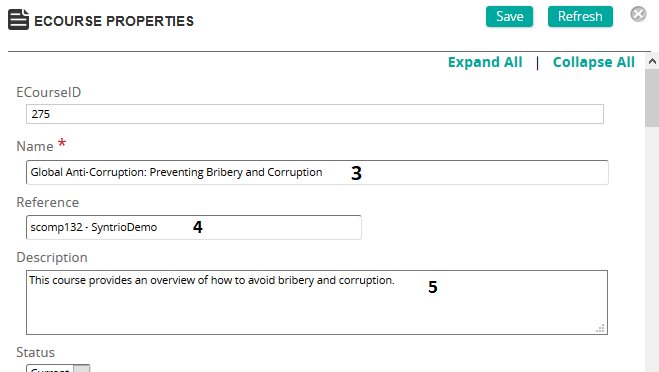
- Type a name for the wrapper (course).
- Type in a reference (used as a filter).
- (Optional) Type a description of the wrapper.
- Add another eCourse as a prerequisite in Prerequisite training section, if applicable. Enter any notes in the prerequisite notes field. (Prerequisites assigned to an eCourse must ALL be mastered before users will be allowed to launch into an eCourse.)
- Enter version number of the course, if applicable.
- Check the following, if:
- The content objects that make up the ecourse should be visible to the student.
- The Activity Tree should be visible to the student.
- Enrollment in the course requires approval.
- Registration for course can be done by supervisors.
- Student can remove this course from personal training list of courses.
- You want to force the student to progress through the content in order from start to finish.
- Student activity is maintained if the student closes the course and returns to it later.
- You want all other courses referencing the same objective to be marked satisfied when the student satisfies the objective in this content.
- Allow Course to Roll Up on Completion Only. This allows SilkRoad Learning to recognize Complete as a passed item. (Related to SCORM settings.)
- Select a certification type if this course needs to be mastered in a certain period of time.
- Select a Grading Type for the course
- Complete/ Incomplete – use if there is NO scored activity in the course
- Percentage – use if there IS a scored activity in the course
- Enter the approximate duration of the course.
- Add the Content Object(s) that belong with this wrapper.
Tip: Multiple content objects can be added to a wrapper.
- Assign categories to the course (optional).
- Select a skin for the course.
- Click Add (top of page) to save your work.